
Trip Manager
School trip management, from plan to return
Plan, approve, communicate and manage every educational visit in one secure platform — with pupil, staff and school data connected to your MIS through Wonde.
- Manage planning, approvals, consent and registers in one trip record.
- Give staff offline registers and parents a clear view in the companion app.
- Keep supported pupil, staff and group data aligned with your MIS.
Built for schools. Connected through Wonde. Designed for staff and parents.
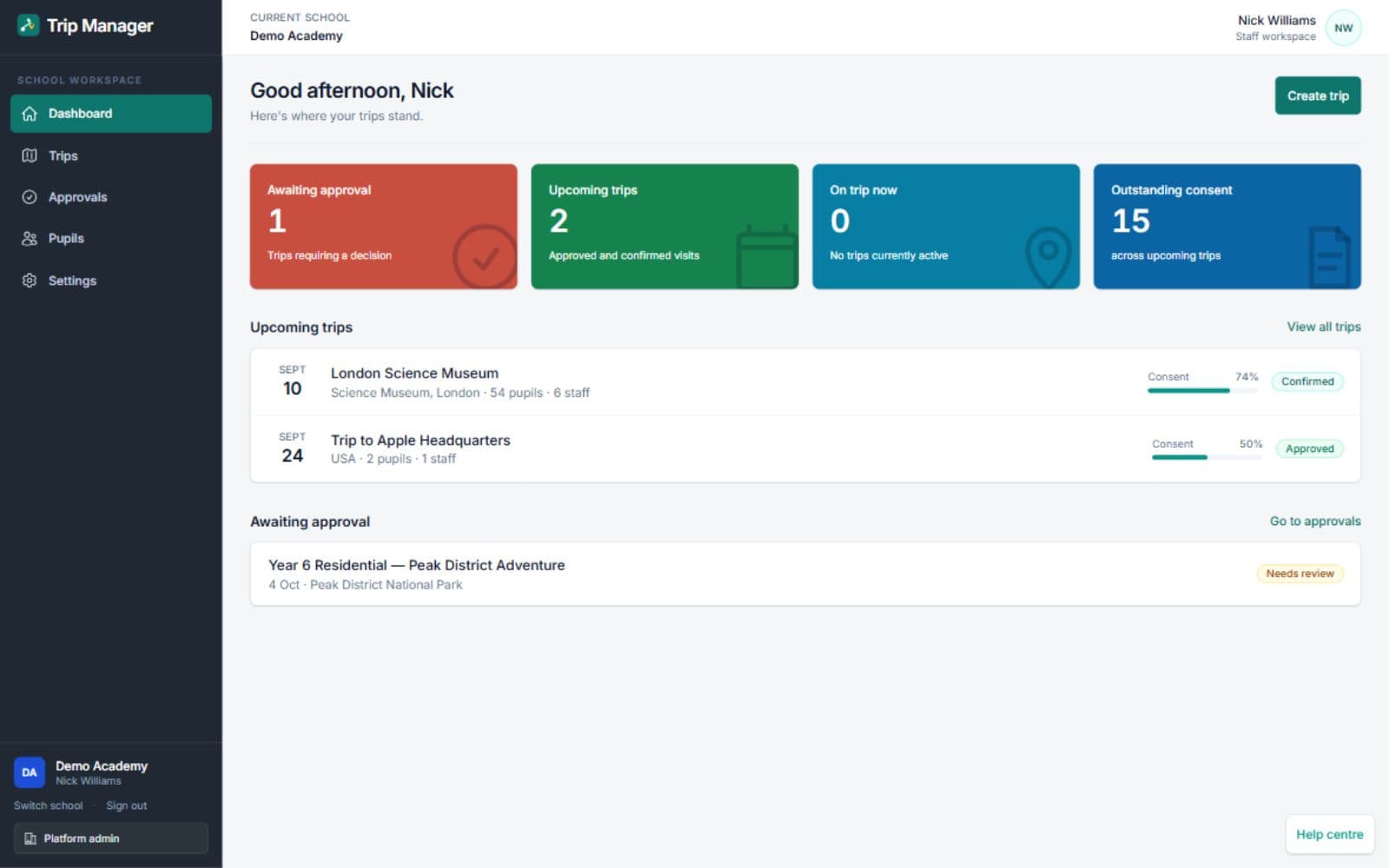
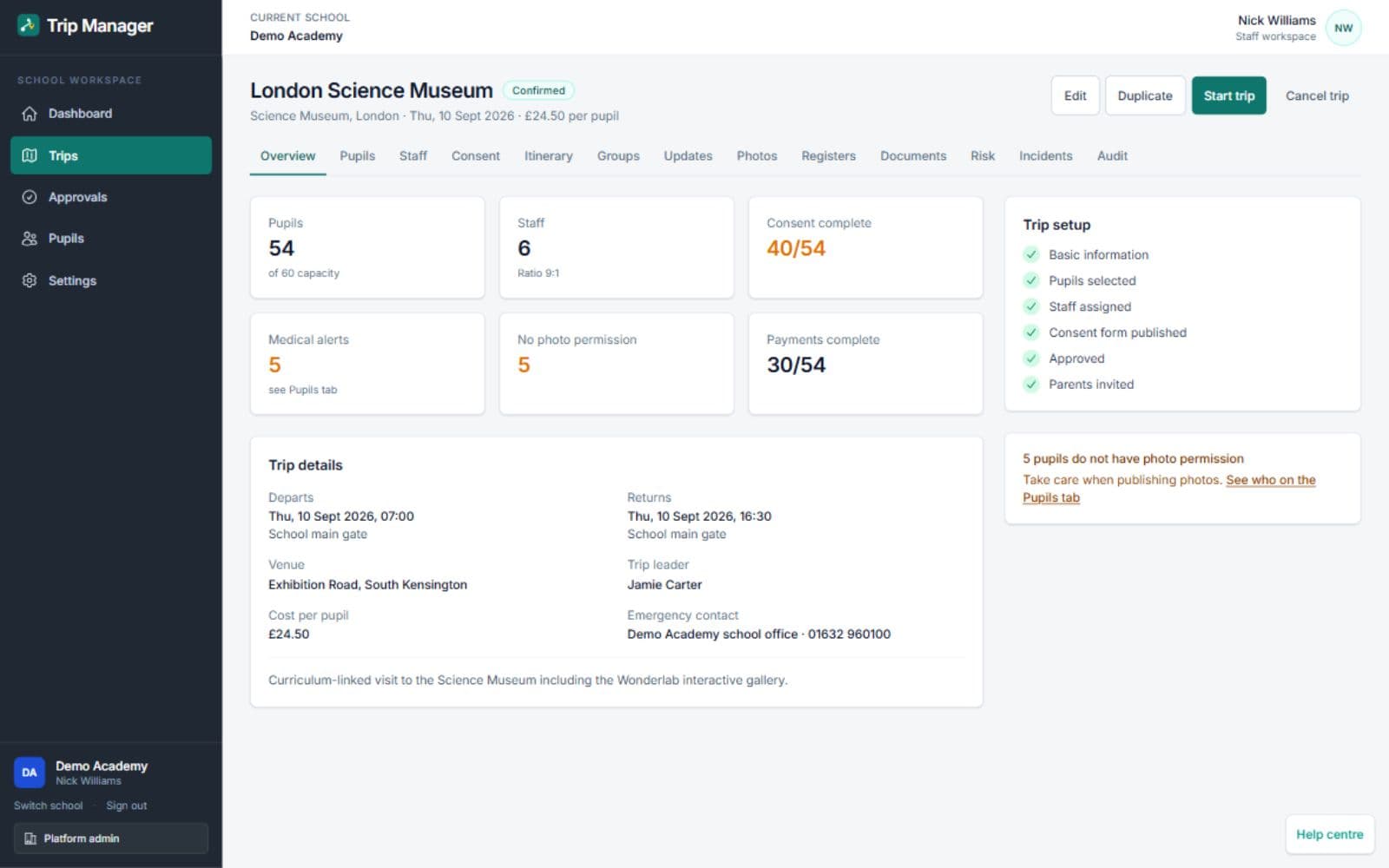
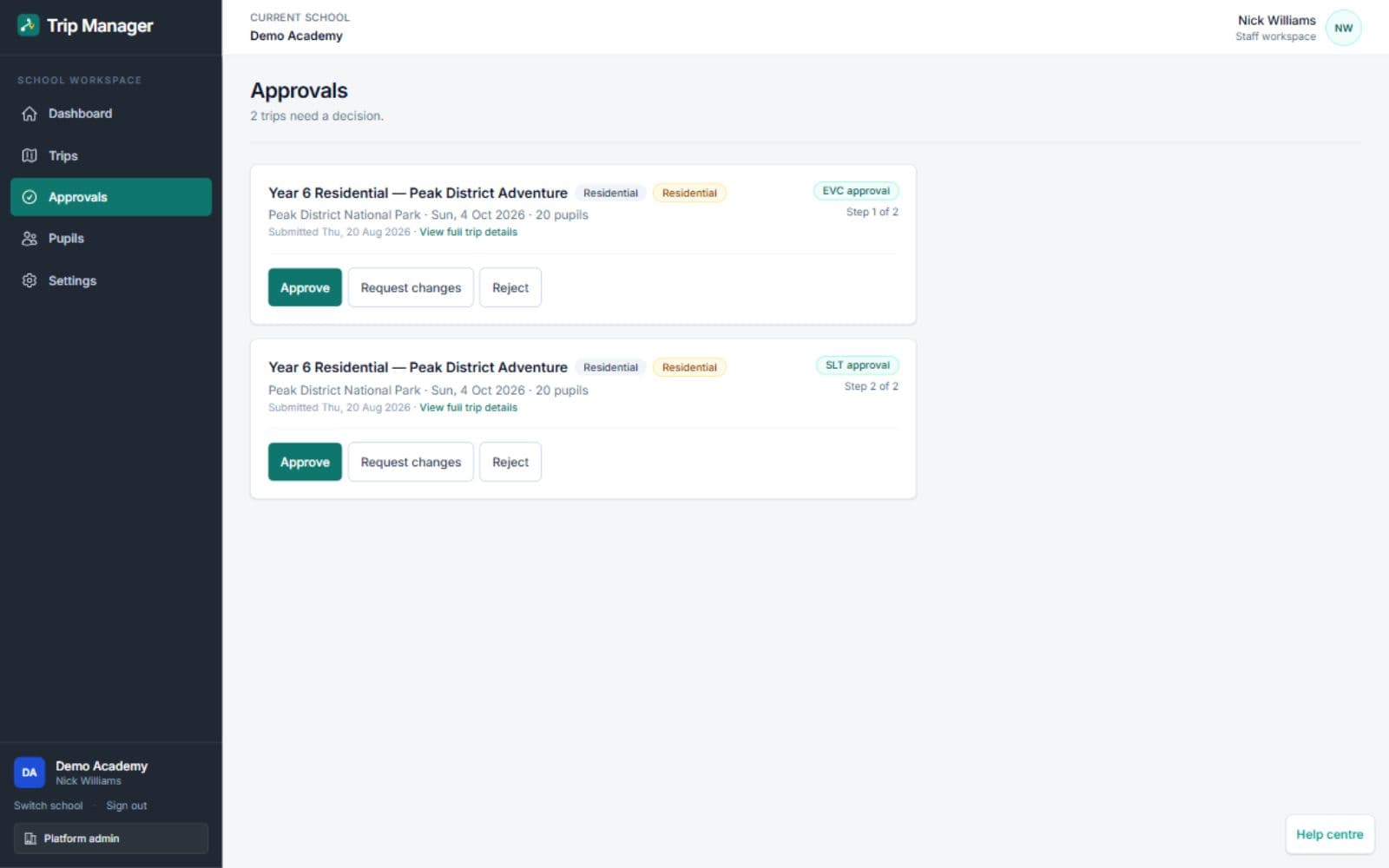
Real screens from Trip Manager
See the school dashboard, a complete visit record, approval stages and staff updates. Captures show the actual application with demonstration visits; any visit costs shown are not platform subscription prices.
What is Trip Manager?
Trip Manager is school trip management software for planning, approving and operating educational visits. It brings staff workflows, parent consent, pupil information, registers and communications together in one trip record.
Instead of a visit living across a planning document, a paper consent slip, a mailbox and a printed register, Trip Manager keeps the whole visit in one place — so staff can see what has been approved, who is going, what parents have responded to and what still needs attention.
It is built for the people who actually run educational visits: Educational Visits Coordinators, senior leaders, trip leaders, operations teams and school administrators — with a parent view and a companion iOS app for staff on the visit.
The problems it is built to solve
- Pupil, staff and group details re-keyed by hand for every visit
- Paper consent slips handed out, lost and chased
- Parent responses tracked across mailboxes and spreadsheets
- No single view of where a visit sits in the approval process
- Trip information fragmented across emails and attachments
- Registers and emergency information hard to reach away from school
- Staff working from a printout that is already out of date
Plan and approve educational visits
Know what has been approved, by whom, and what still needs attention. Trip Manager turns an educational visit into a single record that moves through the school's own approval process, with ownership and history visible the whole way.
- Create a visit and record the operational detail in one place
- Assign a trip leader and the supporting staff going on the visit
- Select the pupils and groups attending, using MIS-connected data where supported
- Route visits through EVC and senior-leader review where required
- Keep approval history and reopen review when material details change
- Identify what still needs attention before the visit goes ahead
Connect Trip Manager to your MIS through Wonde
Already using SIMS, Arbor, Bromcom, iSAMS, ScholarPack or another Wonde-supported MIS? Trip Manager connects through Wonde so your school does not need to manually re-key supported pupil, staff and group data.
One connection route, not a connector per MIS
Wonde provides a secure connection between schools and approved third-party applications. Trip Manager uses that single route rather than building a separate direct integration for each MIS, so the school manages the connection and its permissions in one place.
School MIS
The system your school already maintains
Wonde
Secure MIS connection route
Trip Manager
Pupils, staff and groups, already there
- Pupil and group selection
- Registers
- Supported medical and dietary information
Wonde-supported MIS platforms include
- SIMS
- Arbor
- Bromcom
- iSAMS
- Integris
- ScholarPack
- ScholarPack REST
- PupilAsset
- SchoolBase
- SchoolPod
- Engage
- Engage API
- SatchelOne
- Compass UK
- Databridge
- ET-AIMS
- Go4Schools
- Juniper
- Teacher Centre
- WCBS
- WCBS Hub
- XP Trust
- Cloud School
- Facility
Supported MIS availability is determined by Wonde and may change over time. Data availability also depends on the school's approved permissions and the capabilities of its MIS.
Your school data, already there
Trip Manager can bring the records your school already maintains into each visit, so pupil and staff details are not typed out again for every trip. What is available depends on your MIS and the permissions your school has approved through Wonde.
Synchronised where supported and approved
- Pupils
- Staff
- Classes
- Year groups
- Registration groups
- Medical information
- Dietary information
- Parent or contact information where available
What the MIS integration view shows
- Connection status
- Last successful sync
- Pupil count
- Staff count
- Synced groups
- Available capabilities
- Sync history
Give authorised staff the information they need away from school
Supported medical conditions and dietary requirements can be brought into Trip Manager from your MIS through Wonde, so the staff running a visit work from the school's own records rather than a separately maintained list.
Availability depends on approved data and MIS capabilities. Trip and offline records can contain snapshots, so staff should check their freshness before departure.
- Less duplicate data entry before each visit
- Trip-specific information to review before departure
- Better preparation for the staff leading the visit
- Controlled access, so this information is not shared more widely than it needs to be
- Medical access recorded in the audit trail
Trip Manager supports the staff running a visit. It does not replace the school's safeguarding, risk-assessment or emergency procedures.
Clear consent requests and a view parents can follow
No paper slips. No hunting through old emails. Parents get one place to see the trips that involve their children, read the information the school has published and respond to what the school has asked for.
- See the trips relevant to their children
- Review the trip information the school has published
- Provide consent for a visit
- Respond to requests from the school
- Receive updates about the visit
- Access current trip information rather than an old attachment
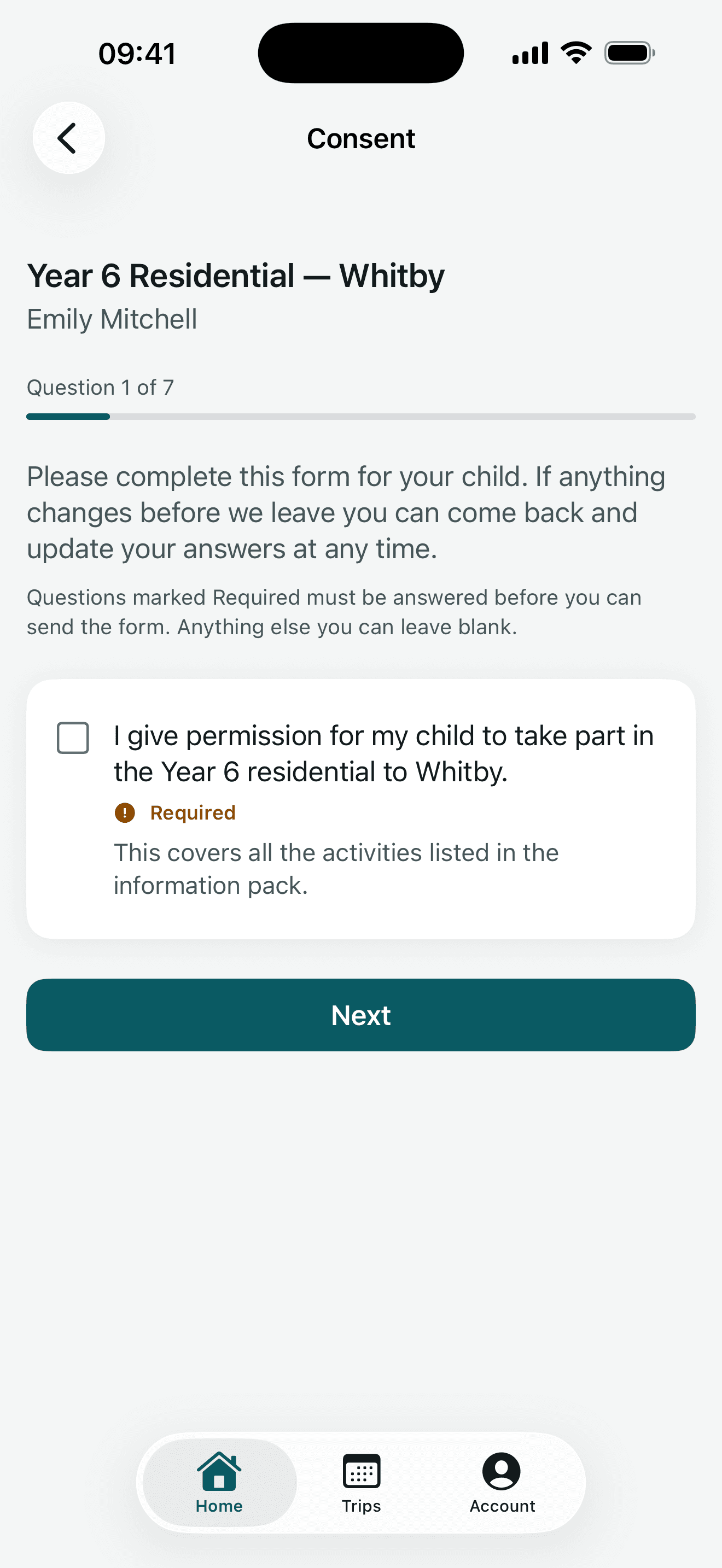
What parents see in the companion app
Trip details and consent questions appear in a view designed for families, with access linked to their children.
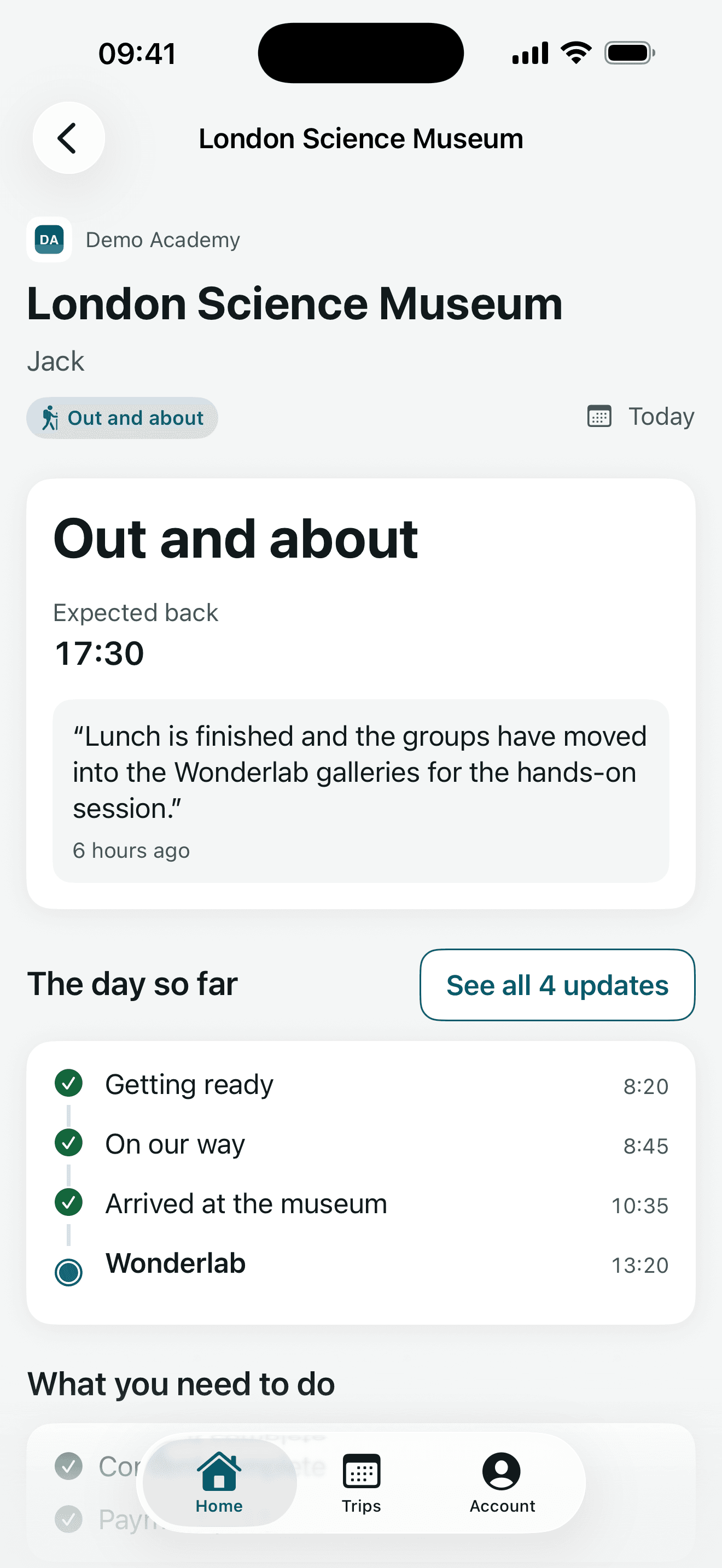
Trip Manager does not stop working when staff leave the school gates
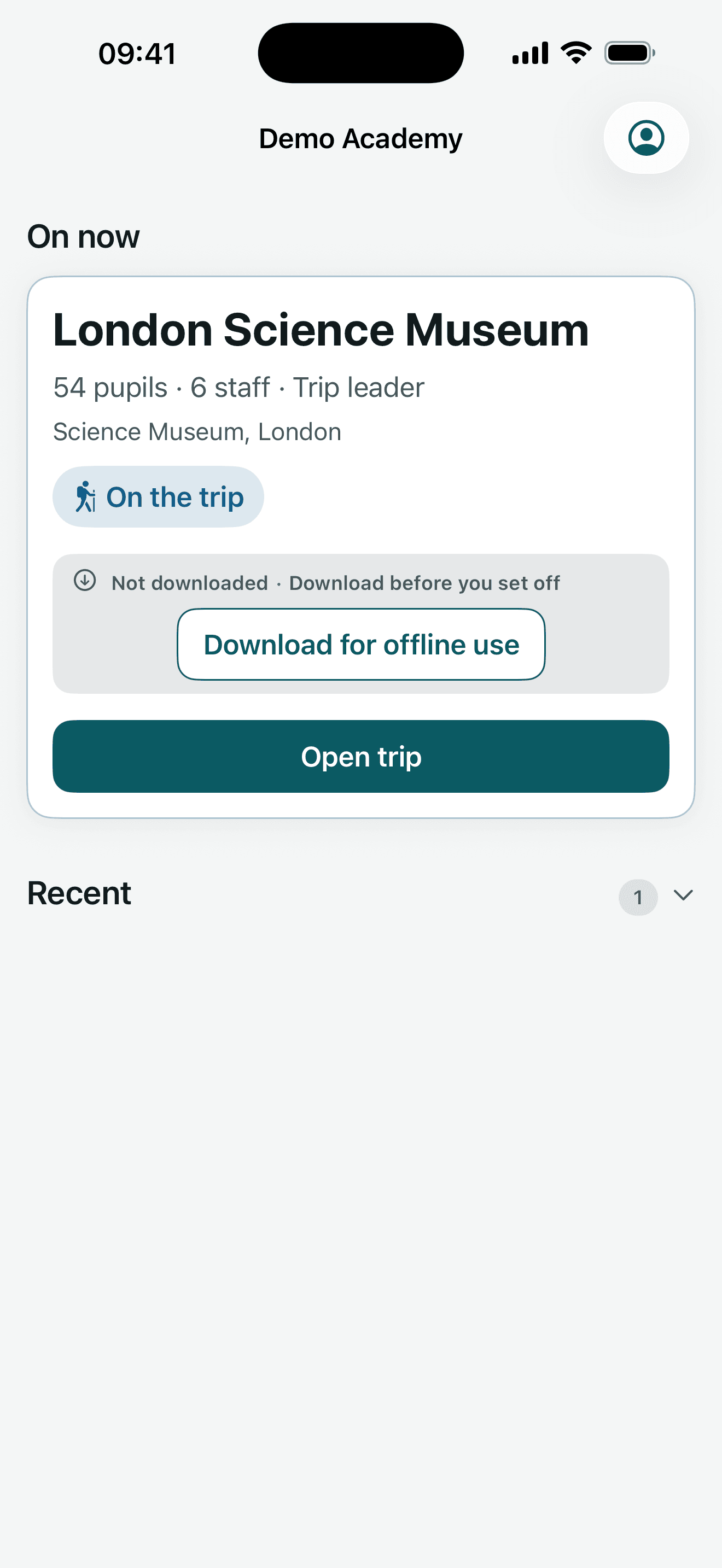
The information staff need most is the information that is hardest to reach on a coach, in a museum or on a residential. Trip Manager keeps the trip record reachable on mobile, so staff are not depending on a printout made the day before.
- Trip dashboards for the visits a member of staff is on
- Pupil lists for the visit
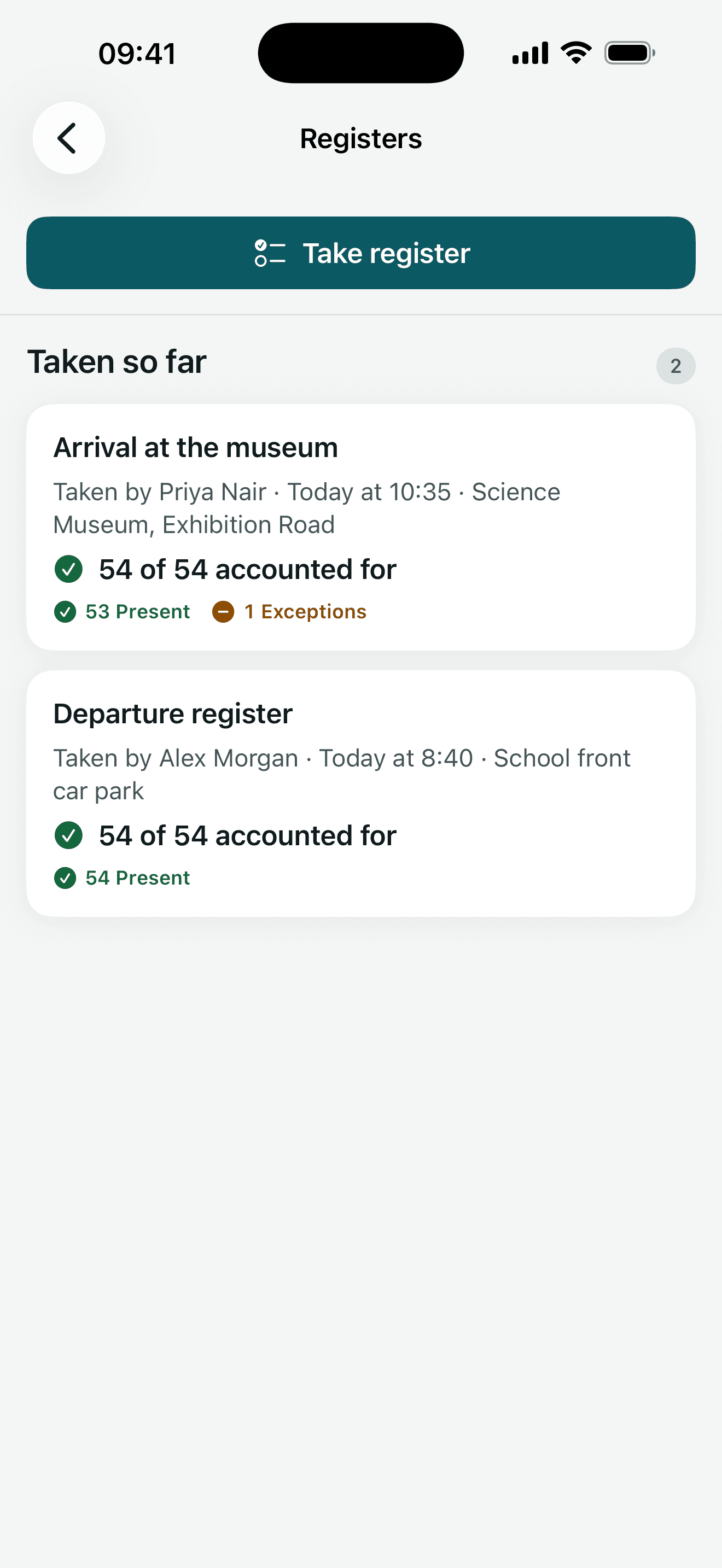
- Registers for taking and checking attendance
- Staffing information for the visit
- Emergency information for the staff who need it
- Communications attached to the trip record
- Mobile access for staff away from school
- Prepare assigned trips in the staff app and queue register marks when offline
An iPhone and iPad app for staff and parents
The companion Trip Manager app brings the visit to iPhone and iPad. Staff can open assigned trips and take registers; parents can follow their child's visit, give consent and read updates.
Available on the App Store as Trip Manager for Education. The app works with a school's Trip Manager platform and requires a school-provided account; downloading it does not set up the school service.
- Trip overview for each visit a member of staff is on
- Pupil list for the visit
- Register for taking and checking attendance
- Key trip information
- Updates about the visit
- Secure photo access
Keep the conversation attached to the trip
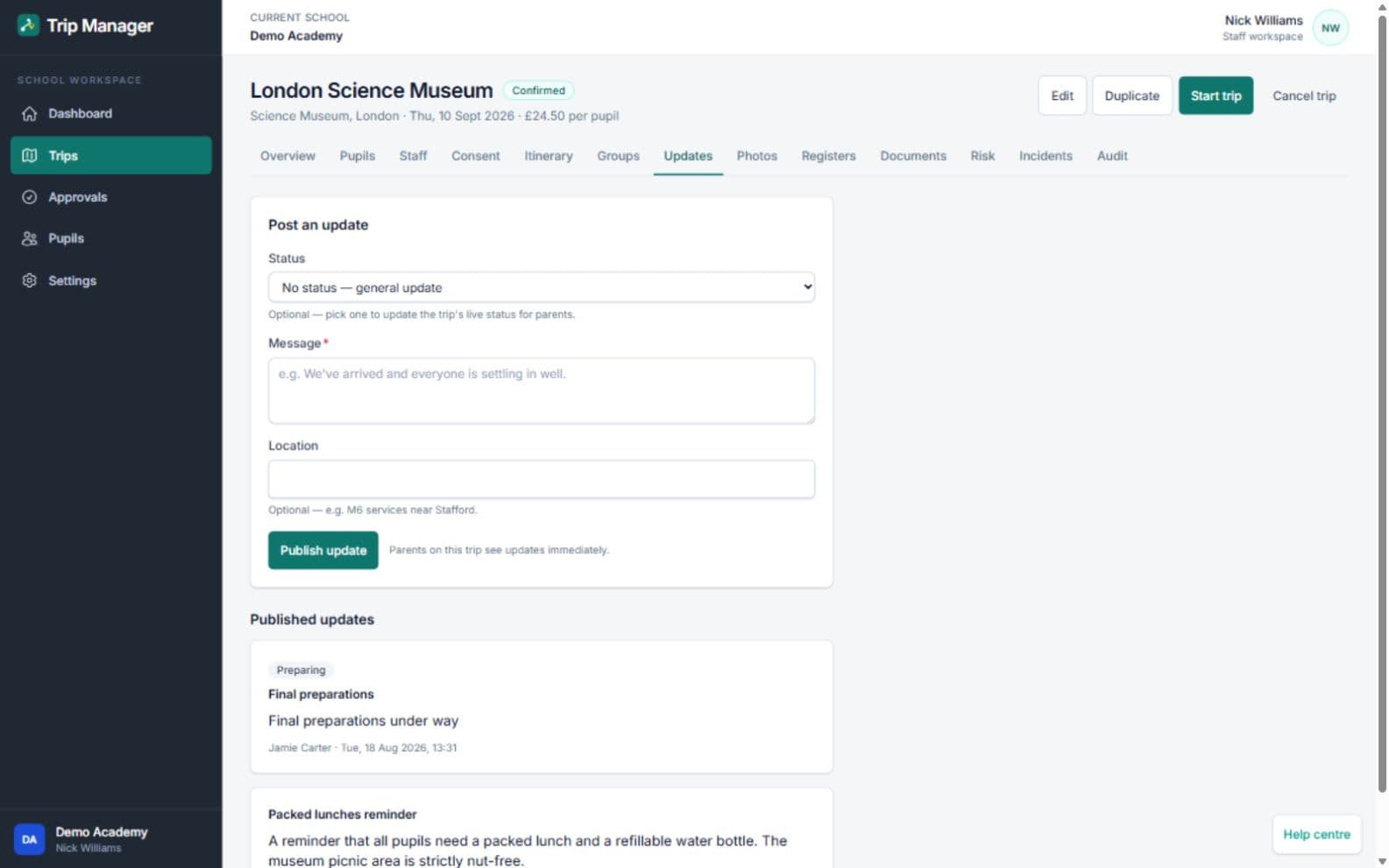
Parent communication, staff information and trip updates stay on the same trip record as the planning, approvals and registers — so the history of a visit is not spread across separate mailboxes.
- Send trip information and updates from the trip record
- Keep parent communication with the visit it belongs to
- Give staff the information for their visit in one place
- Review and publish photos to the trip's private family feed where enabled
Uploads and publication are separate steps. Staff must review photo permissions before publishing; the platform does not automatically identify or obscure pupils in an image. Parent messaging, live status and the photo feed depend on the school's enabled features.
Built for schools, with security at the core
Trip Manager holds pupil information, including supported medical and dietary data, so access is controlled by role and the MIS connection is handled by the Trip Manager backend rather than by the browser.
No new staff password to remember
Staff can sign in with an existing Microsoft work account through Microsoft Entra ID. Trip Manager then applies its own roles and permissions, so signing in with a school account does not by itself grant access to every visit or every pupil record.
- Multi-tenant architecture with school data isolation
- Encrypted integration credentials
- Role-based access controls across staff roles
- Controls around sensitive medical information
- Audit trails
- No MIS token exposed to the browser
- Secure backend-to-Wonde communication
- HTTPS in transit
Security, data-handling and access arrangements are confirmed in writing during onboarding.
How Trip Manager works
From the first plan to the record you keep afterwards, in six steps.
- 1
Create the educational visit
Create the visit and assign responsibility for it.
- 2
Select pupils, groups and staff
Choose who is going, using supported MIS-connected pupil, staff and group data.
- 3
Complete the approval workflow
Move the visit through the school's approval process, with ownership and history recorded.
- 4
Send information and consent requests
Send trip information and consent requests to the parents of the pupils attending.
- 5
Run the visit
Use registers and essential trip information during the visit, on mobile where staff need it.
- 6
Keep the trip record
Keep updates, communications and the trip record together afterwards.
Who Trip Manager is for
Educational Visits Coordinators
See every visit, where it sits in the approval process and what still needs attention — in one place rather than across documents and mailboxes.
Senior leaders
Oversight of educational visits, approvals and outstanding actions without chasing individual staff for updates.
Trip leaders
The pupil list, register, staffing and key trip information for their visit, reachable on mobile away from school.
School operations teams
Planning detail, staffing and communications attached to the visit they belong to, so a trip can be picked up by whoever needs it.
School administrators
Less re-keying of pupil, staff and group data, and fewer paper consent slips to hand out, collect and chase.
Parents
One place to see the trips involving their children, read the trip information and give consent.
One platform for every educational visit
The same trip record works whether the visit is an afternoon at a museum or a week abroad — the planning, approval, consent and register steps are the same shape.
- Museum visits
- Theatre trips
- Residentials
- Sports trips
- University visits
- Fieldwork
- International trips
- Enrichment activities
Trip Manager supports the administration of an educational visit. It does not make a visit compliant or safe — the school's own educational visits policy, risk assessments and approval standards still apply.
Pricing tailored to your school
Talk to Education Host about your school, requirements and rollout plans. Multi-school and trust requirements can be discussed as part of the consultation.
Part of the Education Host platform portfolio
Trip Manager is provided by Education Host, which builds and supports platforms and infrastructure for universities, colleges and schools. Schools can run Trip Manager on its own — the platforms below are related, not required.
Cover Manager
School cover management software for staff absence requests, approvals, cover allocation and daily cover sheets.
Learn moreManaged Infrastructure
Secure, education-focused managed hosting, monitoring, backups and patching from a UK data-centre facility.
Learn moreSchool Hosting
Reliable, secure web hosting for schools and colleges, with SSL, migrations and specialist education support.
Learn moreManaged Technical Support
Specialist support for education platforms and the infrastructure behind them.
Learn moreTrip Manager — frequently asked questions
Answers about school trip planning, consent, MIS data and the companion app.
What is Trip Manager?
Trip Manager by Education Host is school trip management software for planning, approving and operating educational visits. It brings trip planning, approval workflows, staff allocation, pupil selection, parent consent, registers, trip information and communications into one trip record, with pupil, staff and group data connected to the school's MIS through Wonde.
Who is Trip Manager for?
Trip Manager is for UK schools — specifically Educational Visits Coordinators, senior leaders, trip leaders, school operations teams and school administrators, with a parent view for the families of pupils attending a visit.
Can Trip Manager manage parent consent?
Yes. Trip Manager lets schools send trip information and consent requests to parents, and gives parents one place to see the visits relevant to their children, review the information and respond — instead of paper slips and email chasing.
Does Trip Manager connect to our MIS?
Yes. Trip Manager connects to Wonde-supported MIS platforms through Wonde, so supported pupil, staff and group data does not have to be re-keyed for each visit. What is available depends on your MIS and the permissions your school has approved.
Is the MIS integration direct?
No. Trip Manager does not build a separate direct integration for each MIS. MIS connectivity is provided through Wonde, which acts as the single secure connection route between the school's MIS and Trip Manager.
What data can be synchronised through Wonde?
Where supported by the MIS and approved by the school, Trip Manager can synchronise pupils, staff, classes, year groups, registration groups, medical information, dietary information, and parent or contact information where available. Not every MIS exposes every field.
Can staff use Trip Manager away from school?
Yes. Trip Manager gives staff mobile access to the trip dashboard, pupil lists, registers, staffing and key trip information, and keeps essential trip information available when connectivity is poor.
Does Trip Manager have an iOS app?
Yes. Trip Manager for Education is available on the App Store for iPhone and iPad. Staff can prepare trips and take registers offline, while parents can view trip details, consent, updates and photos; a school-provided Trip Manager account is required.
Can staff use Microsoft Entra ID to sign in?
Yes. Staff can sign in to Trip Manager with an existing Microsoft work account through Microsoft Entra ID, so there is no separate staff password to remember. Trip Manager then applies its own roles and permissions.
How is medical and dietary information handled?
Supported medical conditions and dietary requirements can be brought into Trip Manager from the school's MIS through Wonde, and access is controlled by role so the information reaches the authorised staff running the visit. Availability depends on the data your school has approved and the capabilities of your MIS.
Can Trip Manager replace the school's educational visits policy?
No. Trip Manager supports the administration of educational visits — planning, approval, consent, registers and communication. The school's own educational visits policy, risk assessments, safeguarding arrangements and emergency procedures still apply.
How can a school book a demonstration?
Book a Trip Manager demo with Education Host and we will walk through trip planning, approvals, parent consent, registers, MIS-connected data through Wonde and the companion iOS app, and discuss pricing and rollout for your school.
See how Trip Manager could work for your school
Walk through trip planning, approvals, parent consent, registers and MIS-connected pupil and staff data with the team that builds and supports the platform.